> For the complete documentation index, see [llms.txt](https://docs.flowiseai.com/llms.txt). Markdown versions of documentation pages are available by appending `.md` to page URLs; this page is available as [Markdown](https://docs.flowiseai.com/integrations/langchain/document-loaders/spider-web-scraper-crawler.md).
# Spider - web search & crawler
Scrape & Crawl the web with Spider - the fastest open source web scraper & crawler.
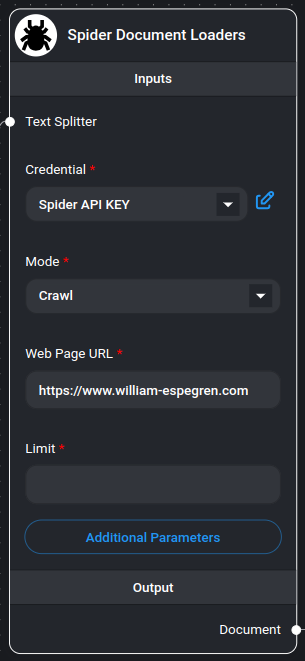
Spider Web Scraper/Crawler Node
[Spider](https://spider.cloud/?ref=flowise) is the fastest open source web scraper & crawler that returns LLM-ready data. To get started using this node you need an API key from [Spider.cloud](https://spider.cloud/?ref=flowise).
## Get Started
1. Go to the [Spider.cloud](https://spider.cloud/?ref=flowise) website and sign up for a free account.
2. Then go to the [API Keys](https://spider.cloud/api-keys) and create a new API key.
3. Copy the API key and paste it into the "Credential" field in the Spider node.
## Features
* Two operation modes: Scrape and Crawl
* Text splitting capabilities
* Customizable metadata handling
* Flexible parameter configuration
* Multiple output formats
* Markdown-formatted content
* Rate limit handling
## Inputs
### Required Parameters
* **Mode**: Choose between:
* **Scrape**: Extract data from a single page
* **Crawl**: Extract data from multiple pages within the same domain
* **Web Page URL**: The target URL to scrape or crawl (e.g., )
* **Credential**: Spider API key
### Optional Parameters
* **Text Splitter**: A text splitter to process the extracted content
* **Limit**: Maximum number of pages to crawl (default: 25, only applicable in crawl mode)
* **Additional Metadata**: JSON object with additional metadata to add to documents
* **Additional Parameters**: JSON object with [Spider API parameters](https://spider.cloud/docs/api)
* Example: `{ "anti_bot": true }`
* Note: `return_format` is always set to "markdown"
* **Omit Metadata Keys**: Comma-separated list of metadata keys to exclude
* Format: `key1, key2, key3.nestedKey1`
* Use \* to remove all default metadata
## Outputs
* **Document**: Array of document objects containing:
* metadata: Page metadata and custom fields
* pageContent: Extracted content in markdown format
* **Text**: Concatenated string of all extracted content
## Document Structure
Each document contains:
* **pageContent**: The main content from the webpage in markdown format
* **metadata**:
* source: The URL of the page
* Additional custom metadata (if specified)
* Filtered metadata (based on omitted keys)
## Usage Examples
### Basic Scraping
```json
{
"mode": "scrape",
"url": "https://example.com",
"limit": 1
}
```
### Advanced Crawling
```json
{
"mode": "crawl",
"url": "https://example.com",
"limit": 25,
"additional_metadata": {
"category": "blog",
"source_type": "web"
},
"params": {
"anti_bot": true,
"wait_for": ".content-loaded"
}
}
```
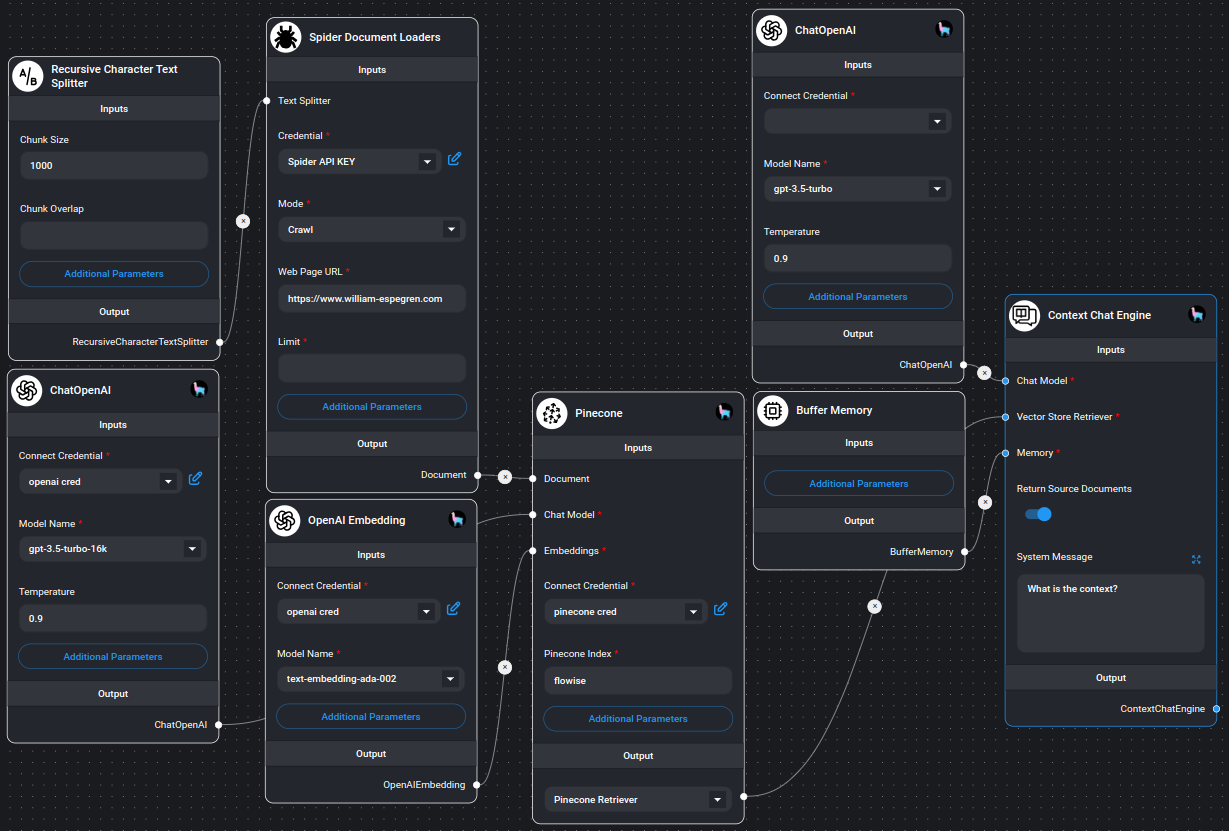
## Example
Example on using Spider node
## Notes
* The crawler respects the specified limit for crawl operations
* All content is returned in markdown format
* Error handling is built-in for both scraping and crawling operations
* Invalid JSON configurations are handled gracefully
* Memory-efficient processing of large websites
* Supports both single-page and multi-page extraction
* Automatic metadata handling and filtering
---
# Agent Instructions
This documentation is published with GitBook. GitBook is the documentation platform designed so that both humans and AI agents can read, navigate, and reason over technical content effectively. Learn more at gitbook.com.
## Querying This Documentation
If you need additional information that is not directly available in this page, you can query the documentation by asking a question.
Perform an HTTP GET request on the following URL with the `ask` and `goal` query parameters:
```
GET https://docs.flowiseai.com/integrations/langchain/document-loaders/spider-web-scraper-crawler.md?ask=&goal=
```
`ask` is the immediate question: it should be specific, self-contained, and written in natural language.
`goal` is what the user is ultimately trying to achieve, the reason they need the answer. Sharing it helps GitBook give you a better, more relevant answer. A goal is most helpful when it describes the outcome the user wants rather than restating the question. For example, with `ask=how do I create an API token`, a goal like `automate deployments from our CI pipeline` lets GitBook tailor the answer to that use case.
The response will contain a direct answer to the question and relevant excerpts and sources from the documentation.
Use this mechanism when the answer is not explicitly present in the current page, you need clarification or additional context, or you want to retrieve related documentation sections.