> For the complete documentation index, see [llms.txt](https://docs.flowiseai.com/llms.txt). Markdown versions of documentation pages are available by appending `.md` to page URLs; this page is available as [Markdown](https://docs.flowiseai.com/espanol/documentacion-oficial/usar-flowise/analytic.md).

# Analytic

Aprende cómo analizar y solucionar problemas en tus flujos de chat y flujos de agentes

***

Hay varios proveedores de analítica con los que Flowise se integra:

* [LunaryAI](https://lunary.ai/)
* [Langsmith](https://smith.langchain.com/)
* [Langfuse](https://langfuse.com/)
* [LangWatch](https://langwatch.ai/)

## Lunary

[Lunary](https://lunary.ai/) es una plataforma de monitoreo y análisis para chatbots LLM.

Flowise se ha asociado con Lunary para proporcionar una integración completa que soporta seguimiento de usuarios, seguimiento de retroalimentación, repetición de conversaciones y análisis detallado de LLM.

Los usuarios de Flowise pueden obtener un 30% de descuento en el Plan Teams usando el código `FLOWISEFRIENDS` durante el pago.

Lee más sobre cómo configurar Lunary con Flowise [aquí](https://lunary.ai/docs/integrations/flowise).

## Configuración

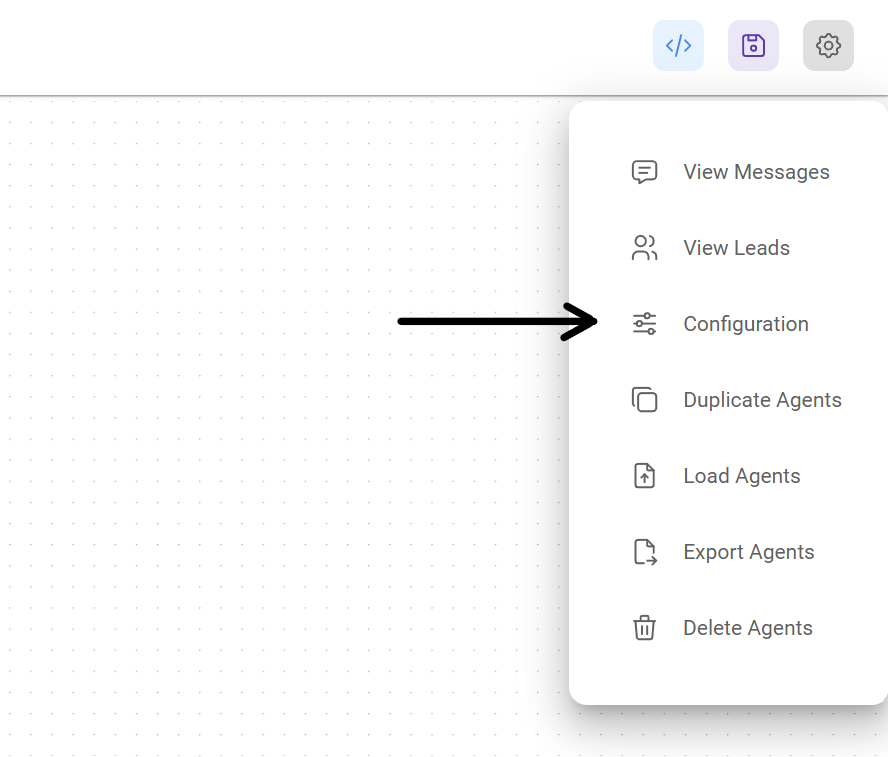
1. En la esquina superior derecha de tu Flujo de Chat o Flujo de Agente, haz clic en **Configuración** > **Configuración**

<figure><img src="https://4068692976-files.gitbook.io/~/files/v0/b/gitbook-x-prod.appspot.com/o/spaces%2FUiD7nOmFRK805sNuiieJ%2Fuploads%2Fgit-blob-c4693d4dc7a34d3203ee60dc442eaeacb6798b22%2Fanalytic-1.webp?alt=media" alt="Captura de pantalla del usuario haciendo clic en el menú de configuración" width="375"><figcaption></figcaption></figure>

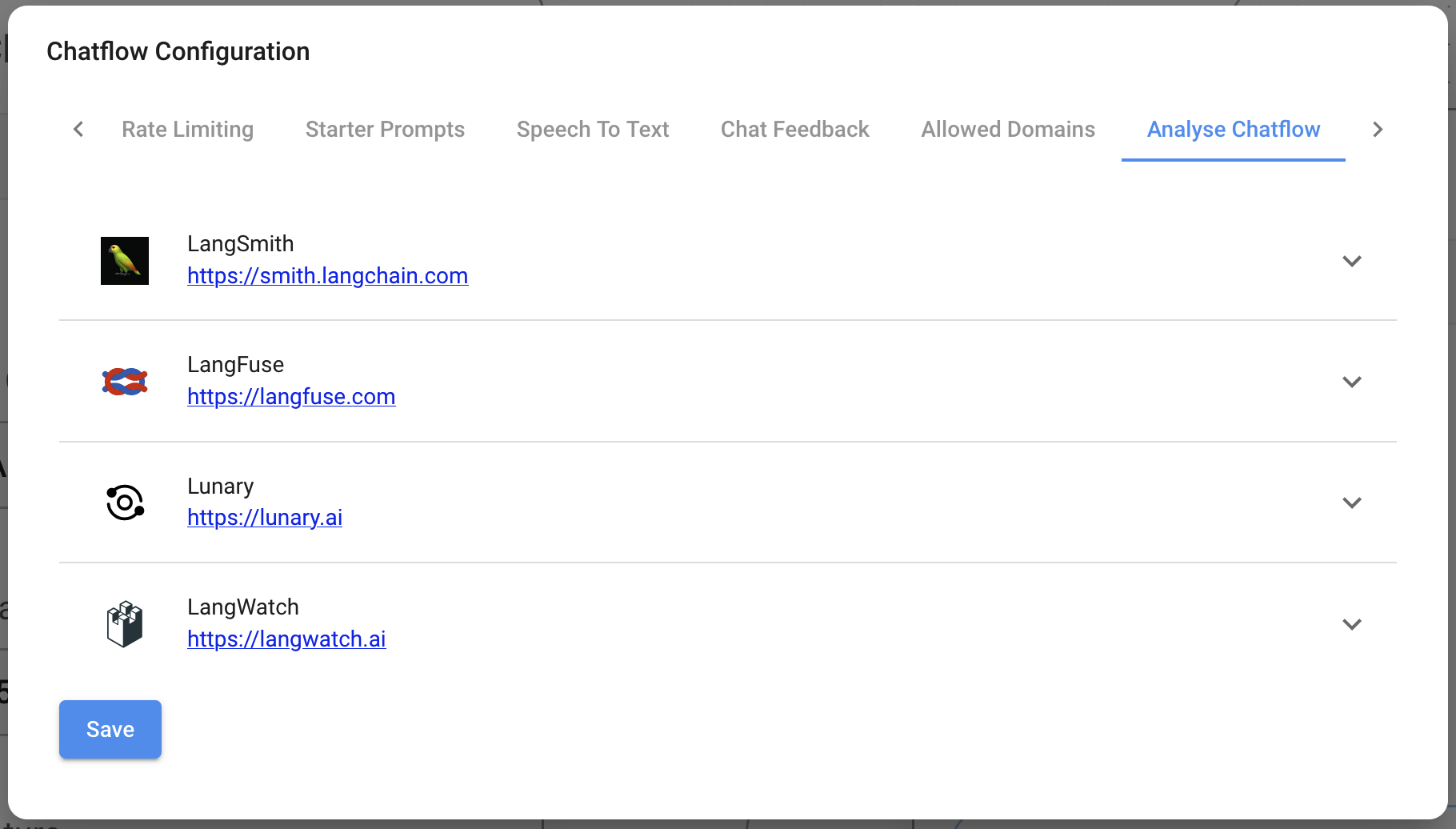
2. Luego ve a la sección Analizar Flujo de Chat

<figure><img src="https://4068692976-files.gitbook.io/~/files/v0/b/gitbook-x-prod.appspot.com/o/spaces%2FUiD7nOmFRK805sNuiieJ%2Fuploads%2Fgit-blob-c564e9f8d4228022e6eaef7491e7e277db90ef8b%2Fanalytic-2.png?alt=media" alt="Captura de pantalla de la sección Analizar Flujo de Chat con los diferentes proveedores de Analítica"><figcaption></figcaption></figure>

3. Verás una lista de proveedores, junto con sus campos de configuración

<figure><img src="https://4068692976-files.gitbook.io/~/files/v0/b/gitbook-x-prod.appspot.com/o/spaces%2FUiD7nOmFRK805sNuiieJ%2Fuploads%2Fgit-blob-c668dd1841418781b2959b06ec441e7de86b0320%2Fimage%20(82).png?alt=media" alt="Captura de pantalla de un proveedor de analítica con campos de credenciales expandidos"><figcaption></figcaption></figure>

3. Completa las credenciales y otros detalles de configuración, luego activa el proveedor en **ON**

<figure><img src="https://4068692976-files.gitbook.io/~/files/v0/b/gitbook-x-prod.appspot.com/o/spaces%2FUiD7nOmFRK805sNuiieJ%2Fuploads%2Fgit-blob-bbb0da47679b34192545931719c0f97cdf21c9a7%2Fimage%20(83).png?alt=media" alt="Captura de pantalla de proveedores de analítica habilitados"><figcaption></figcaption></figure>

## API

Una vez que la analítica ha sido activada desde la interfaz de usuario, puedes sobrescribir o proporcionar configuración adicional en el cuerpo de la [API de Predicción](/espanol/documentacion-oficial/usar-flowise/api.md#prediction-api):

```json
{
  "question": "hola",
  "overrideConfig": {
    "analytics": {
      "langFuse": {
        // langSmith, langFuse, lunary, langWatch
        "userId": "usuario1"
      }
    }
  }
}
```

---

# Agent Instructions
This documentation is published with GitBook. GitBook is the documentation platform designed so that both humans and AI agents can read, navigate, and reason over technical content effectively. Learn more at gitbook.com.

## Querying This Documentation
If you need additional information that is not directly available in this page, you can query the documentation by asking a question.

Perform an HTTP GET request on the following URL with the `ask` and `goal` query parameters:

```
GET https://docs.flowiseai.com/espanol/documentacion-oficial/usar-flowise/analytic.md?ask=<question>&goal=<user_goal>
```

`ask` is the immediate question: it should be specific, self-contained, and written in natural language.
`goal` is what the user is ultimately trying to achieve, the reason they need the answer. Sharing it helps GitBook give you a better, more relevant answer. A goal is most helpful when it describes the outcome the user wants rather than restating the question. For example, with `ask=how do I create an API token`, a goal like `automate deployments from our CI pipeline` lets GitBook tailor the answer to that use case.

The response will contain a direct answer to the question and relevant excerpts and sources from the documentation.

Use this mechanism when the answer is not explicitly present in the current page, you need clarification or additional context, or you want to retrieve related documentation sections.