> For the complete documentation index, see [llms.txt](https://docs.flowiseai.com/llms.txt). Markdown versions of documentation pages are available by appending `.md` to page URLs; this page is available as [Markdown](https://docs.flowiseai.com/espanol/documentacion-oficial/integraciones/utilities/set-get-variable.md).
# Set/Get Variable
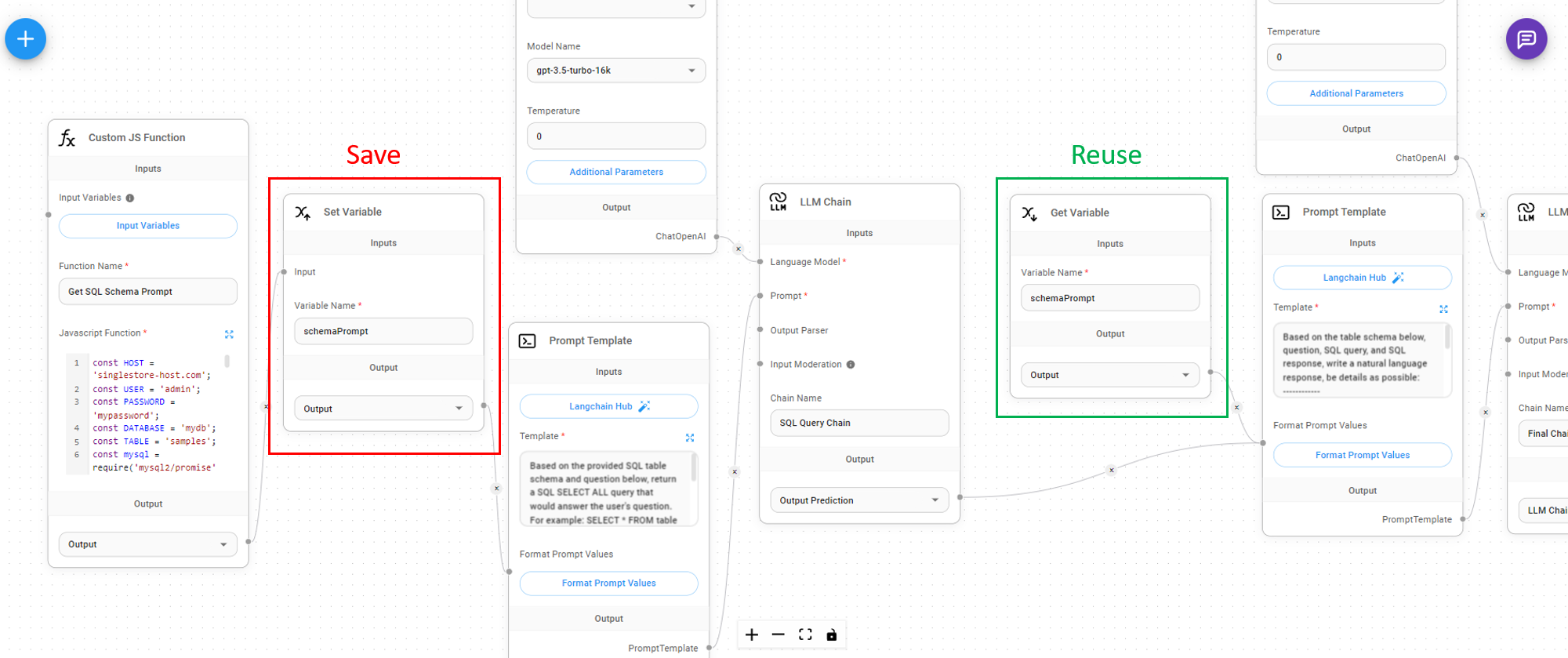
Si estás ejecutando una Custom Function o LLM Chain, es posible que desees reutilizar el resultado en otros nodos sin tener que recalcular/reejecutar lo mismo nuevamente. Puedes guardar el resultado de salida como una variable y reutilizarlo en otros nodos que estén más adelante en el flujo.
### Set Variable
Tomando entradas de cualquier nodo que produzca salidas de tipo `string, number, boolean, json, array,` podemos asignarle un nombre de variable.
### Get Variable
Puedes obtener el valor de la variable usando el nombre de la variable en una etapa posterior:
%20(1)%20(1)%20(1)%20(1)%20(1).png?alt=media)
%20(1)%20(2).png?alt=media)